Pages

Install ADB and Fastboot on Ubuntu

Fastboot is a tool that can be used to re-flash partitions on your Android device. Useful for the installation of new custom recovery (e.g. twrp) and operating systems like Cyanogenmod on preloaded Android. 


Install Apache Tomcat 8 on Ubuntu 14.04

Install Java
sudo su
sudo apt-get install default-jdk
Install Tomcat
Download the and extract the Tomcat package. New versions can be download from Tomcat wesbite.

Install Canon MF220 printer in Ubuntu


Copy Linux driver pack from CD with printer or download from Canon website.
Extract the package in home folder.
Enter into the package folder using Terminal,

sudo su
cd Linux_UFRII_PrinterDriver_V320_us_EN

Make the install.sh file executable,

chmod -R 777 install.sh

Run the install file,

./install.sh

Open printer admin page in a browseer http://localhost:631/admin
Add printer and change settings. 

Edit crontab with gedit or nano


Editing crontab with vim is may feel difficult for basic Linux users. Users can open crontab with other text editor like gedit. Apply following command to open crontab with gedit.


env EDITOR=gedit crontab -e

Remove Guest Session at login in Ubuntu 14.04

Open Terminal using the short key, Ctrl + Alt + T
Apply following command to open the configuration file.


sudo gedit /usr/share/lightdm/lightdm.conf.d/50-ubuntu.conf

Add following line below the last line,

allow-guest=false

Turn off animations (ripple effects) on Android Lollipop

You can adjust or turnoff animations and ripple effects on Android Lollipop and custom ROMs including CyanogenMod 12.

Go to Settings > Developer options


Find Animator  duration scale. Decrease its number.


Install TeamViewer on Ubuntu

TeamViewer is a proprietary desktop sharing tool. A simple tool for beginners to share and access the remote computer.

Installation
Download TeamViewer, go to the following link and download package,

http://www.teamviewer.com/hi/download/linux.aspx

Download Ubuntu package

Install Samsung ML-1676P laser printer on Ubuntu

Samsung ML-1676P is one of the  popular printer. A different method is essential to install Linux driver on Ubuntu.

1. Download ML-1670spl.ppd and rastertosamsungsplc (32bit and 64bit) files. Check your machine type (32bit or 64bit) and download appropriate rastertosamsungsplc utility. Copy files to home folder.

2. Connect Samsung ML-1676P print to the computer.

2. Go to Applications > System Tools > System settings > Printers

3. Click on Add New printer and proceed with the installation steps.
In the stage of choose a driver for your printer.
Select the PPD file (ML-1670spl.ppd) option on the driver selection window in the printer application.

4. Copy rastertosamsungsplc to /usr/lib/cups/filter/ in home folder of computer.

sudo su
mv rastertosamsungsplc /usr/lib/cups/filter/

The installation finished. Try to make a print out.

Information courtesy: Thejaswi Puthraya

Install ClockWorkMod (CWM) recovery in Android phone: an easy method

ClockWorkMod. Image courtesy: XDA Developers Forum
Recovery is a bootable partition of Android operating system and where lot of repairing tools available. We can compare recovery with BIOS in computer. ClockworkMod recovery is an alternative recovery for stock Android. It can give lot of options rather than stock Android recovery. 

Installation of CWM (ClockworkMod) recovery using other tools (e.g) ADB and Fast Boot tool) seems difficulty for new kids in Android arena. CWM allows backup and restore of stock ROM. Using CWM user can update/replace stock Android and install other custom ROM like Cyanogenmod.

Root Lenovo A6000 and A6000 plus

Rooting of Lenovo A6000 / A6000 plus is very easy with King Root application. You can download King Root APK file from here.

Permission problems with Cyanogenmod default file manager

Cyanogenmod new users have reported that file manager shows following message whenever they try  to copy or move files to another location;

"This operation requires elevated permissions. Try changing to Root Access Mode"

Solution is that install another file manager. ES File Explorer File Manager is a good application to use instead of default file manager with Cyanogenmod.

In my experience ES File manager is very smooth. An inbuilt media player is available and users can play media files without leaving the file manager.

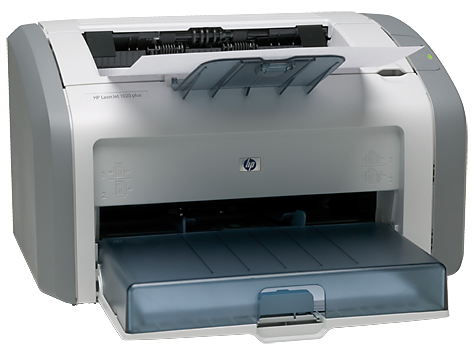
Add HP LaserJet 1020 Plus Printer to Ubuntu/Debian

HP LaserJet 1020 Plus is a popular printer. This printer can work well with Windows. HP Linux drivers are available and it makes our work easy. The following method tell about how to add the printer into Debian/Ubuntu

Connect your printer with the computer.
Install the following HP Printer packages
sudo apt install hplip hplip-gui
Add the user to the printer group
sudo usermod -a -G lp $USER
sudo sermod -a -G lpadmin $USER
Open the HP Tool Box from application menu and install Plugin.
Restart the printer.

Retain "Extract here" in nautilus

File compression option seems missing after installation of Debian Linux. This situation happens when not selecting utility tools while installation process. The result is that you cant see "Extract here" and "Compress" option in right mouse click. Don't worry, you can retain file compression features in right button selection. 

Install File Roller and Xarchiver to solve the problem. Open a Terminal and execute following commands,

su
apt-get install file-roller xarchiver


How to add Debian software repository

Software repository does not add when we install Debian Linux from CD/DVD without Internet connection. You can't update the Debian Linux without software repository. But you can add software repository later. Find a repository near your area. Download from remote server take long time to download updates.

You can find Debian software repository near your area by visiting Debian Source List Generator

In my experience, repositories from India is slow and so I make use Debian repositories from Japan. 

Add repository address to Debian

Open Applications > Accessories > Terminal 
Open sources file and add repository address.

su
leafpad /etc/apt/sources.list

Copy paste the lines to the file. Here is the repository from Japan,

deb http://ftp.jp.debian.org/debian/ wheezy main
deb-src http://ftp.jp.debian.org/debian/ wheezy main

deb http://security.debian.org/ wheezy/updates main
deb-src http://security.debian.org/ wheezy/updates main

# wheezy-updates, previously known as 'volatile'
deb http://ftp.jp.debian.org/debian/ wheezy-updates main
deb-src http://ftp.jp.debian.org/debian/ wheezy-updates main

Save and close the file. Update the sources list.

apt-get update

Install Indian fonts

India is a country rich with regional languages. You can install regional language fonts in Ubuntu. Apply following command in a terminal,

sudo apt-get update
sudo apt-get install fonts-indic


This font package include Malayalam, Hindi, Tamil, Kannada etc.

Install Malayalam Fonts alone
Apply following command to install only Malayalam Fonts.

sudo apt-get install fonts-mlym

Beautiful Malayalam fonts available at Swathantra Malayalam Computing website.

Image courtesy: IIT Madras